
[H5]系统级API示例
Author: 张皓帆、傅腾
网络请求
const xRequest = new xsyrpa.XRequest();

//发起open api请求
xRequest.request({
  url: '/rest/data/v2.0/xobjects/account/description',
  headers: {},
  method: "GET"
}).then((data) => {
  //请求成功
  console.log(data)
}).catch((ex)=>{
  //请求失败
  console.log(ex)
});

//POST请求
xRequest.request({
  url: '/rest/data/v2.0/xobjects/account',
  headers: {
    'Content-Type': 'application/json'
  },
  method: 'POST',
  payload: {
    "data": {
      "accountName": "我的客户",
      "entityType": 6263664,
      "highSeaId": 366125,
      "dimDepart": 601512
    }
  }
})

//公网请求, 完整url,从"https://"开始
xRequest.request({
  url: "https://cat-fact.herokuapp.com/facts",
  headers: {},
  method: "GET"
});
通知方法
const notificationMessage = new xsyrpa.NotificationMessage();
notificationMessage.success({message: "成功"});
notificationMessage.warning({message: "警告"});
notificationMessage.error({message: "失败"});
触发确认弹框
const notificationMessage = new xsyrpa.NotificationMessage();

//触发确认框
notificationMessage.confirm({
    message: "确认保存?"
}).then(() => {
    console.log("成功");
}).catch(() => {
    console.log("失败");
});
打开新页面
const systemUtils = new xsyrpa.SystemUtils();

//打开内部(lapp)页面,或者打开需要认证的外部网站,需要使用自定义菜单
//统一认证中心认证通过后,跳转到自定义页面,会自动在query里贴上access token
//这里返回的是开发页面中使用 (js sdk 的) systemUtils.sendBackResult() 发送的数据
systemUtils.openWindow({url: 'mcode'}).then((dataFromWindow) => {
  console.log(dataFromWindow);
});

//直接打开外部页面
systemUtils.openWindow({url: 'https://www.xiaoshouyi.com'});
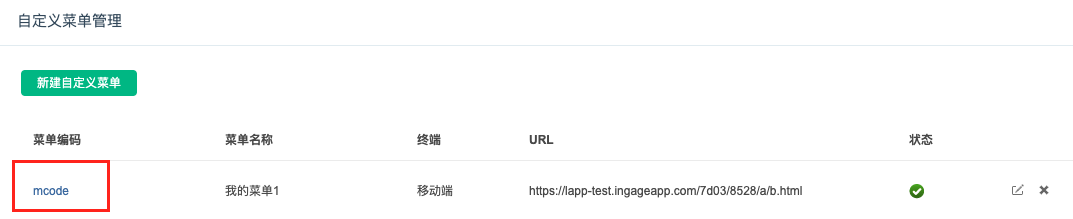
例子中的'mcode'是菜单编码,在后台"开发者平台"、"自定义菜单"中配置。

打开Dialog
当要打开一个开发页面,然后让开发页面传回数据时,建议使用 openDialog()。需要注意的是,在 openDialog()打开的页面里调用sendBackResult()会关闭该 Dialog。
//'windowSize'和'title'在H5端无效果
ext_SystemUtils.openDialog({ url: "dialogCode", windowSize: 1, title: "" }).then(data => {
  ...
})
获取当前登录的用户信息
请注意,H5端用户信息是从企业微信传递过来的,需要通过企业微信手机或者桌面端App打开,才能拿到用户信息。
使用浏览器访问/bff/breeze/wxwork拿不到用户信息。
const systemUtils = new xsyrpa.SystemUtils();
systemUtils.currentUser().then((user) => {
    console.log(user);
});
返回到上一页
一般在lapp自定义页面中使用,返回到主App。
const systemUtils = new xsyrpa.SystemUtils();
systemUtils.goBack();
刷新当前页面
const systemUtils = new xsyrpa.SystemUtils();
systemUtils.refreshCurrentPage();