
[Web]列表页代码示例
Author: 郑颍丽、江炜
列表页
普通按钮扩展

const NEWBTNID = "newButtonId";
const NEWCREATIONBTNID = "newCreationButtonId";

//获取列表页扩展实例
const ext_opportunity_ListPage_ListPage = new xsyrpa.EntityListPageExtensionPoint(“opportunity.ListPage#*#ListPage");

//获取“导入销售机会”按钮扩展实例
const ext_opportunity_ListPage_import_Button = new xsyrpa.ButtonExtensionPoint("opportunity.ListPage#*#import.Button”);

//列表页初始化完成 -- 生命周期事件inited
ext_opportunity_ListPage_ListPage.on("inited", async () => {

    //隐藏导入销售机会按钮
    ext_opportunity_ListPage_import_Button.setVisible(false);


    //替换标准的 新建 按钮
    const newCreationButton = await ext_opportunity_ListPage_ListPage.replaceCreationButton({
        extId:NEWCREATIONBTNID,
        text:"新建逻辑"
    });
    newCreationButton.on("onClick",()=>{
        //按钮新逻辑
    });


    //新增标准按钮和点击事件
    const newButton = await ext_opportunity_ListPage_ListPage.addButtonItem({
        extId: NEWBTNID,
        text: "新按钮"
    });
    newButton.on("onClick",()=>{
        //新按钮点击事件
    });

});
批量按钮扩展
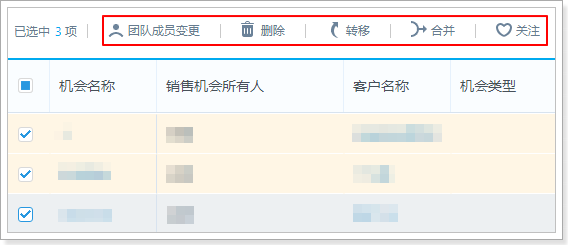
const NEWBTACHBTNID = "newBatchButtonId";

//获取列表页扩展实例
const ext_opportunity_ListPage_ListPage = new xsyrpa.EntityListPageExtensionPoint(“opportunity.ListPage#*#ListPage");

//列表页初始化完成 -- 生命周期事件inited
ext_opportunity_ListPage_ListPage.on("inited", async () => {

    //新增批量按钮
       const newBatchButton = await ext_opportunity_ListPage_ListPage.addBatchButtonItem({
        extId: NEWBTNID,
        text: "新批量按钮"
    });
    newBatchButton.on("onClick",async ()=>{
        //获取批量选中Ids
        const ids = await ext_opportunity_ListPage_ListPage.getSelectedIds();
    });

});
列表页
// 实例化列表页扩展点(订单列表为例)
const ext_order_ListPage_ListPage = new xsyrpa.EntityListPageExtensionPoint("order.ListPage#*#ListPage");

// 列表页加载完成
ext_order_ListPage_ListPage.on('inited', ()=>{
   //无数据传出
});

//获取列表选中的数据Id
ext_order_ListPage_ListPage.getSelectedIds().then((data)=>{
  // data 为 ids 数组
});

// 刷新列表表格部分
ext_order_ListPage_ListPage.refreshData();

// 向表格传递筛选条件并刷新
// 每次传递的筛选条件是覆盖之前的, 但会和手动操作的条件以及视图的自带条件叠加后查询
ext_order_ListPage_ListPage.addFilterConditions({
   conditions,  // 条件集合
   expression  // 高级公式
});

//列表页所有字段扣框编辑禁用(true全部禁用,false无响应)
ext_order_ListPage_ListPage.invokeAsync('setEntityItemReadonly',true)
/*
    列表搜索API说明
    1. 通过addFilterConditions 向列表传递搜索条件为替换模式。
        即: 每次执行筛选的条件均为 列表当前视图系统自带筛选条件 AND API传递条件。
    2. API传递条件中的参数:
        item 实体字段itemId
        type 表达式运算符
            3 => in (文本型字段时,为like模糊匹配)
            10 => equal
            12 => fromTo (区间, 如数值型 在10~20之间, {item:xxx, type:12, value:"10,20"})
        value 表达式右值
        id 当使用expression描述多个条件之间的关系时使用
        (建议使用10以上值作为id, 因为系统列表视图中有的会带有默认条件中含有id(如我负责的XXX),或自定义检索视图本身带有公式时。)
    3. expression
        多个条件间的关系公式。如果是空则条件之间默认为 AND 关系。
        API传递此参数后, 融合系统中现有筛选条件时
        系统中没有expression, 直接使用。
        系统中有expression,  System_expression + 'AND ('  + expression + ')' 组合使用。
        鉴于2中提到的id冲突问题,expression参数传递时 示例 "11 OR 12";
*/