
[Web]系统级API示例
Author: 唐溢泓
网络请求操作
网络请求是个通用底层API,可以对销售易公开API发起请求,包括第三方可跨域请求
//网络请求实例
const ext_XRequest = new xsyrpa.XRequest();
//发起请求
ext_XRequest.request({
    url: "/rest/api/***",
    headers: {},
    method: "GET"
}).then((data) => {
    //请求成功
}).catch((ex)=>{
    //请求失败
});

//XOQL的query string部分需要使用encodeURIComponent
ext_XRequest.request({
    url: `/rest/data/v2/query?q=${encodeURIComponent('select id, productName from product')}`,
    headers: {},
    method: 'GET'
})

//POST请求
ext_XRequest.request({
    url:'/data/v1/objects/***',
    headers: {
        Content-Type:'application/json'
    },
    method: 'POST',
    payload:{
        record:{}
    }
})
系统通知方法
通过SDK操作系统消息通知
- 触发成功消息

// 实例化系统通知方法
const notificationMessage = new xsyrpa.NotificationMessage();
// 触发成功的消息
notificationMessage.success({
    message: "保存成功"
});
- 触发失败消息

//实例化系统通知方法
const notificationMessage = new xsyrpa.NotificationMessage();

//触发成功的消息
notificationMessage.error({
    message: "保存失败"
});
- 触发警告消息

// 实例化系统通知方法
const notificationMessage = new xsyrpa.NotificationMessage();
// 触发成功的消息
notificationMessage.warning({
    message: "警告"
});
- 触发确认弹框
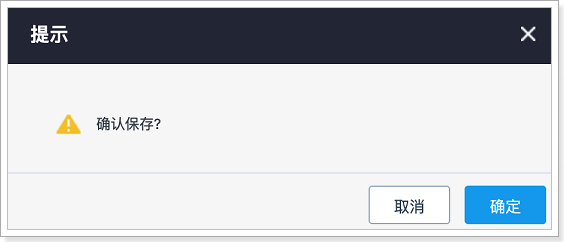
//实例化系统通知方法
const notificationMessage = new xsyrpa.NotificationMessage();

//触发确认框
notificationMessage.confirm({ message: "确认保存?" }).then((data) => {
console.log(data,"成功");
}).catch((data) => {
console.log(data,"失败");
 });
系统基础方法
- 打开新窗口
const systemUtils = new xsyrpa.SystemUtils();

//打开Web新窗口
systemUtils.openWindow({url:"https://wwww.baidu.com"});
- 打开弹出框
const systemUtils = new xsyrpa.SystemUtils();

//打开Web新窗口
ext_SystemUtils.openDialog({ url: "https://www.baidu.com", title: "百度示例", windowSize: 2 });
- 刷新当前页
const systemUtils = new xsyrpa.SystemUtils();

//刷新当前页
systemUtils.refreshCurrentPage();
- 显示隐藏IM消息
const systemUtils = new xsyrpa.SystemUtils();

//显示IM消息
systemUtils.setIMVisible(true);

//隐藏IM消息
systemUtils.setIMVisible(false);
- 创建日程
// 实例化全局扩展点中的系统基础方法扩展点
const ext_SystemUtils = new xsyrpa.SystemUtils();

// 创建日程
ext_SystemUtils.openScheduleCreate({
   users:[{id:1, name:'张三'}, {id: 2,name: '李四'}]
});
- 打开发送企业微信弹框
// 实例化全局扩展点中的系统基础方法扩展点
const ext_SystemUtils = new xsyrpa.SystemUtils();

// 打开和指定用户的企业微信对话框
ext_SystemUtils.openIMSDialog({
    id: 1,
    name: '张三'
});
- 新建编辑实体Form
// 实例化全局扩展点中的系统基础方法扩展点
const ext_SystemUtils = new xsyrpa.SystemUtils();

// 打开实体新建弹框
ext_SystemUtils.openEntityDialog({
    entityApiKey: 'customize',  // 自定义实体传参 customize
    entityId: 1080313572917287, // 自定义实体id
    entityTypeId: 1080314194673700, //要新建的业务类型id
    postData:'',                 // 额外传参
    entityName: '自定义',         // 弹框显示的名字
    edit:false                   //  是否是编辑
});

// 打开新建商机明细弹框
ext_SystemUtils.openEntityDialog({
    edit: false,  //是否是编辑
    entityId: 18, //实体ID(商机明细)
    parentEntityId: 3,  //父实体(商机)ID
    parentDataId: 1091903814418476,  //商机数据ID
    entityTypeId: 886943,  //商机数据业务类型ID
    productFamilyId:'',   //价格表ID
    hasDetailData:1,  //商机上是否已存在明细数据
    entityApiKey:'opportunityproduct',
    entityName: 'Opportunity Products'
})
- 获取当前登入用户的信息
const ext_SystemUtils = new xsyrpa.SystemUtils();
ext_SystemUtils.currentUser().then((user) => {
    console.log(user)
})
- 设置页面按钮
const ext_SystemUtils = new xsyrpa.SystemUtils("SystemUtils");
//visible 按钮是否显示
//url 点击按钮的跳转url
//text 按钮文字
//tipText 按钮的提示文字
//bgColor 按钮背景色
//textColor 文字颜色
ext_SystemUtils.invokeAsync('setCRMPgBtn',{'visible': true,'url': 'https://www.baidu.com/','text': '测试','tipText': '测试','bgColor': '#f00','textColor': '#00f'});